
Building Distributed Multi-Agent Systems with Google’s AI Stack: Part 6
Deploying to Cloud: Cloud Run and Vertex AI Agent Engine

Building Production Multi-Agent Systems with Google’s AI Stack series:
Part 1: From Monolithic AI to Distributed Intelligence: Building Your First Multi-Agent System
Part 2: Making Agents Talk: Agent-to-Agent (A2A) Protocol Deep Dive
Part 3: Building the Orchestrator: Coordinating Agents with the AgentTool Pattern
Part 4: Scaling Multi-Agent Workflows: Solving the Token Limit Problem
Part 5: External Tool Integration via Model Context Protocol (MCP)
Part 6: Deploying to Cloud: Cloud Run and Vertex AI Agent Engine ← You are here
Welcome Back!
In Part 5, we integrated external tools via MCP. Now we have a complete multi-agent system running locally.
It’s time to deploy to the cloud!
In this article, we’ll deploy:
5 specialist agents → Cloud Run (containerized, auto-scaling)
Creative Director orchestrator → Vertex AI Agent Engine (managed runtime)
We’ll also leverage:
Parallel deployment (3x faster)
Two-stage A2A configuration
Automated URL collection
Let’s ship it!
Deployment Architecture Overview
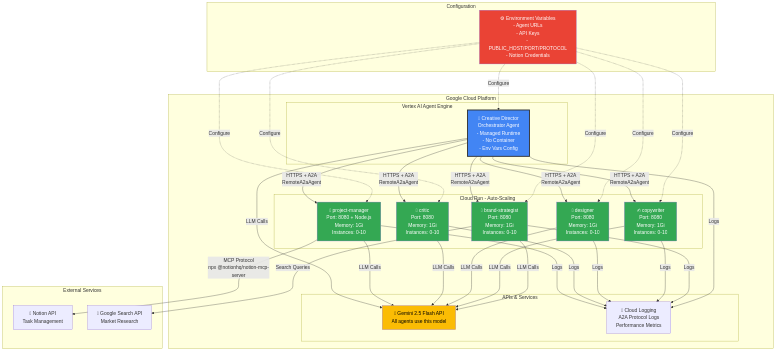
Why This Architecture?
Specialists on Cloud Run:
Independent scaling (scale copywriter separately)
Containerized (full control over environment)
Auto-scaling (0–100 instances)
Cost-efficient (pay only when running)
Orchestrator on Agent Engine:
Managed runtime (no container maintenance)
Integrated with Vertex AI
Built-in monitoring
Prerequisites
1. Google Cloud Project Setup
# Install gcloud CLI
# macOS:
brew install google-cloud-sdk
# Linux:
curl https://sdk.cloud.google.com | bash
# Verify
gcloud --version
# Login and set project
gcloud auth login
gcloud config set project YOUR_PROJECT_ID
# Enable required APIs
gcloud services enable \
    run.googleapis.com \
    aiplatform.googleapis.com \
    cloudbuild.googleapis.com \
    artifactregistry.googleapis.com
2. Environment Variables
Create .env file:
# Google Cloud
PROJECT_ID=your-gcp-project-id
REGION=us-central1
# Gemini API
GOOGLE_API_KEY=your-gemini-api-key
# Notion (optional)
NOTION_API_KEY=your-notion-token
NOTION_DATABASE_ID=your-projects-db-id
TASKS_DATABASE_ID=your-tasks-db-id
3. Service Accounts Setup
No setup needed! Cloud Run automatically uses the default Compute Engine service account with all necessary permissions.
This simplifies deployment, no need to create custom service accounts.
Creating Dockerfiles for Specialist Agents
Standard Agent Dockerfile
# agents/brand_strategist/Dockerfile
FROM python:3.12-slim
WORKDIR /app
# Install system dependencies
RUN apt-get update && apt-get install -y \
    gcc \
    curl \
    && rm -rf /var/lib/apt/lists/*
# Install uv for faster dependency installation
COPY --from=ghcr.io/astral-sh/uv:latest /uv /usr/local/bin/uv
# Copy requirements and install
COPY requirements.txt .
RUN uv pip install --system --no-cache -r requirements.txt
# Copy agent code
COPY agent.py .
# Create non-root user for security
RUN useradd -m -u 1000 appuser && chown -R appuser:appuser /app
USER appuser
# Environment
ENV PYTHONUNBUFFERED=1
ENV PORT=8080
ENV HOST=0.0.0.0
EXPOSE 8080
# Run A2A server
CMD [”python”, “agent.py”]
Project Manager Dockerfile (with Node.js for MCP)
# agents/project_manager/Dockerfile*
FROM python:3.12-slim
WORKDIR /app
# Install Node.js for Notion MCP server
RUN apt-get update && apt-get install -y \
    nodejs \
    npm \
    gcc \
    curl \
    && rm -rf /var/lib/apt/lists/*
# Verify Node.js
RUN node --version && npm --version
# Install uv
COPY --from=ghcr.io/astral-sh/uv:latest /uv /usr/local/bin/uv
# Install Python dependencies
COPY requirements.txt .
RUN uv pip install --system --no-cache -r requirements.txt
# Copy agent code
COPY agent.py .
# Create non-root user
RUN useradd -m -u 1000 appuser && chown -R appuser:appuser /app
USER appuser
# Environment
ENV PYTHONUNBUFFERED=1
ENV PORT=8080
ENV HOST=0.0.0.0
EXPOSE 8080
CMD [”python”, “agent.py”]
Parallel Deployment (3x Faster!)
The Problem: Sequential Deployment
# Old approach (SLOW - sequential)
# Deploy each agent one by one
# Total: 15 minutes! ❌
The Solution: Async Parallel Deployment
# deploy/deploy_all_specialists.py
import asyncio
import subprocess
from typing import Dict, List
AGENTS = [
    {”name”: “brand-strategist”, “dir”: “brand_strategist”},
    {”name”: “copywriter”, “dir”: “copywriter”},
    {”name”: “designer”, “dir”: “designer”},
    {”name”: “critic”, “dir”: “critic”},
    {”name”: “project-manager”, “dir”: “project_manager”},
]

async def deploy_single_agent(
    agent_config: Dict,
    project_id: str,
    region: str
) -> str:
    “”“Deploy a single agent to Cloud Run”“”
    name = agent_config[”name”]
    agent_dir = agent_config[”dir”]
    service_account = f”{name}-sa”
    print(f”🚀 Deploying {name}...”)
    agent_path = Path(__file__).parent.parent / agent_dir
    sa_email = f”{service_account}@{project_id}.iam.gserviceaccount.com”
    # Build environment variables
    env_vars = (
        f”GOOGLE_GENAI_USE_VERTEXAI=true,”
        f”GOOGLE_CLOUD_PROJECT={project_id},”
        f”GOOGLE_CLOUD_LOCATION={region}”
    )    # Add Notion credentials for project-manager
    if name == “project-manager”:
        notion_api_key = os.getenv(”NOTION_API_KEY”)
        notion_db_id = os.getenv(”NOTION_DATABASE_ID”)
        if notion_api_key and notion_db_id:
            env_vars += f”,NOTION_API_KEY={notion_api_key},NOTION_DATABASE_ID={notion_db_id}”
    # Deploy command
    cmd = [
        “gcloud”, “run”, “deploy”, name,
        “--source=.”,
        “--port=8080”,
        “--platform=managed”,
        f”--region={region}”,
        f”--project={project_id}”,
        f”--service-account={sa_email}”,
        “--no-allow-unauthenticated”,
        f”--set-env-vars={env_vars}”,
        “--memory=1Gi”,
        “--cpu=1”,
        “--timeout=300”,
        “--max-instances=10”,
        “--min-instances=0”,
        “--quiet”
    ]
    # Run deployment asynchronously
    process = await asyncio.create_subprocess_exec(
        *cmd,
        stdout=asyncio.subprocess.PIPE,
        stderr=asyncio.subprocess.PIPE,
        cwd=agent_path
    )
    stdout, stderr = await process.communicate()
    if process.returncode != 0:
        print(f”❌ Failed to deploy {name}: {stderr.decode()}”)
        return None
    print(f”✓ {name} deployed successfully”)
    # Get service URL
    url = await get_service_url(name, project_id, region)
    return url

async def deploy_all_agents(project_id: str, region: str) -> Dict[str, str]:
    “”“Deploy all agents in parallel and collect URLs”“”
    print(”\n” + “=”*70)
    print(”Deploying all specialist agents to Cloud Run (in parallel)”)
    print(”=”*70 + “\n”    # Deploy all agents in parallel using asyncio.gather
    tasks = [
        deploy_single_agent(agent, project_id, region)
        for agent in AGENTS
    ]
    results = await asyncio.gather(*tasks)
    # Build URL mapping
    agent_urls = {}
    for agent, url in zip(AGENTS, results):
        if url:
            agent_urls[agent[”name”]] = url
    print(”\n” + “=”*70)
    print(f”✓ Deployment complete! {len(agent_urls)}/{len(AGENTS)} agents deployed”)
    print(”=”*70)    return agent_urls
Speed comparison:
Sequential: 5 agents × 3 min = 15 minutes
Parallel: ~5 minutes
3x faster!
Two-Stage A2A Configuration
Remember our dual configuration from Part 3? Here’s how it works in deployment:
Stage 1: Initial Deployment
# Deploy with basic environment variables
gcloud run deploy brand-strategist \
    --source=. \
    --set-env-vars=GOOGLE_CLOUD_PROJECT=...,... \
    --region=us-central1
# Service is deployed!
# But agent card still shows placeholder URL
Stage 2: Update A2A Configuration
async def update_agent_a2a_config(
    service_name: str,
    url: str,
    project_id: str,
    region: str
) -> None:
    “”“Update deployed agent with PUBLIC_HOST, PUBLIC_PORT, PROTOCOL”“”
    # Extract PUBLIC_HOST from URL
    # URL: https://brand-strategist-xxx.us-central1.run.app
    public_host = url.replace(”https://”, “”).replace(”http://”, “”).split(”/”)[0]
    print(f”   Updating A2A config for {service_name}...”)
    # Build environment variables update
    env_vars_update = f”PUBLIC_HOST={public_host},PUBLIC_PORT=443,PROTOCOL=https”
    # Add Notion credentials for project-manager
    if service_name == “project-manager”:
        notion_api_key = os.getenv(”NOTION_API_KEY”)
        if notion_api_key:
            env_vars_update += f”,NOTION_API_KEY={notion_api_key}”
    cmd = [
        “gcloud”, “run”, “services”, “update”, service_name,
        “--platform=managed”,
        f”--region={region}”,
        f”--project={project_id}”,
        f”--update-env-vars={env_vars_update}”,
        “--quiet”
    ]
    process = await asyncio.create_subprocess_exec(*cmd)
    await process.wait()
    if process.returncode == 0:
        print(f”   ✓ A2A config updated for {service_name}”)
    else:
        print(f”   Warning: Could not update A2A config for {service_name}”)
Now the agent card shows the correct URL:
{
  “name”: “brand_strategist”,
  “rpc_url”: “https://brand-strategist-xxx.us-central1.run.app:443”
}
Perfect for the orchestrator to discover!
Deploying the Orchestrator to Agent Engine
Step 1: Prepare Agent Code
# agents/creative_director/agent.py
# Agent creation code from Part 4
# Returns App (with context compaction)
root_agent = create_creative_director()
# That’s it! Agent Engine handles the rest
Step 2: Deploy to Agent Engine
# deploy/deploy_orchestrator.py
from google.cloud import aiplatform
from pathlib import Path
def deploy_orchestrator(agent_urls: Dict[str, str], project_id: str, region: str):
    “”“Deploy Creative Director to Vertex AI Agent Engine”“”
    print(”\n” + “=”*70)
    print(”Deploying Creative Director to Vertex AI Agent Engine”)
    print(”=”*70)
    # Initialize Vertex AI
    aiplatform.init(project=project_id, location=region)
    # Prepare environment variables with agent URLs
    env_vars = {
        “GOOGLE_API_KEY”: os.getenv(”GOOGLE_API_KEY”),
        “STRATEGIST_AGENT_URL”: agent_urls.get(”brand-strategist”),
        “COPYWRITER_AGENT_URL”: agent_urls.get(”copywriter”),
        “DESIGNER_AGENT_URL”: agent_urls.get(”designer”),
        “CRITIC_AGENT_URL”: agent_urls.get(”critic”),
        “PM_AGENT_URL”: agent_urls.get(”project-manager”),
    }
    print(”\n📋 Environment variables:”)
    for key, value in env_vars.items():
        if “API_KEY” not in key:
            print(f”   {key}={value}”)
    # Read requirements
    requirements = [”google-adk”, “google-genai”, “python-dotenv”]
    # Deploy to Agent Engine
    print(”\n🚀 Deploying to Agent Engine...”)
    reasoning_engine = aiplatform.ReasoningEngine.create(
        reasoning_engine={
            “agent_file”: “agent.py”,
            “agent_name”: “root_agent”,  # Name of variable in agent.py
            “requirements”: requirements
        },
        display_name=”creative-director-orchestrator”,
        description=”Creative Director orchestrator for AI Creative Studio”,
        requirements=requirements,
        extra_packages=[Path(”agents/creative_director”)],
        env_vars=env_vars
    )
    resource_name = reasoning_engine.resource_name
    print(f”\n✅ Orchestrator deployed!”)
    print(f”   Resource name: {resource_name}”)
    print(f”\n💡 Save this to .env:”)
    print(f”   AGENT_ENGINE_RESOURCE_NAME={resource_name}”)
    return resource_name
Key points:
Deploys
agent.pywithroot_agentvariableSets all agent URLs in environment variables
Orchestrator discovers agents at runtime!
One-Command Deployment
The Complete Deployment Script
#!/bin/bash
# deploy/deploy_complete_system.sh
set -e
echo “======================================================================”
echo “   AI Creative Studio - Complete System Deployment”
echo “======================================================================”
# Load environment
if [ ! -f .env ]; then
    echo “❌ Error: .env file not found”
    exit 1
fi
source .env
echo “”
echo “📋 Configuration:”
echo “   Project: $PROJECT_ID”
echo “   Region: $REGION”
echo “”
# Step 1: Deploy all specialist agents in parallel
echo “Step 1/2: Deploying specialist agents to Cloud Run (parallel)...”
python3 deploy_all_specialists.py
if [ $? -ne 0 ]; then
    echo “❌ Specialist deployment failed”
    exit 1
fi
# Step 2: Deploy orchestrator
echo “”
echo “Step 2/2: Deploying orchestrator to Vertex AI Agent Engine...”
python3 deploy_orchestrator.py --action deploy
if [ $? -ne 0 ]; then
    echo “❌ Orchestrator deployment failed”
    exit 1
fi
echo “”
echo “======================================================================”
echo “   ✅ Complete System Deployed Successfully!”
echo “======================================================================”
echo “”
echo “🧪 Test your system:”
echo “   python3 test_orchestrator.py”
echo “”
Run It!
cd deploy
chmod +x deploy_complete_system.sh
./deploy_complete_system.sh
Output
======================================================================
   AI Creative Studio - Complete System Deployment
======================================================================
📋 Configuration:
   Project: my-project-123
   Region: us-central1
Step 1/2: Deploying specialist agents to Cloud Run (parallel)...
======================================================================
Deploying all specialist agents to Cloud Run (in parallel)
======================================================================
🚀 Deploying brand-strategist...
🚀 Deploying copywriter...
🚀 Deploying designer...
🚀 Deploying critic...
🚀 Deploying project-manager...
✓ brand-strategist deployed successfully
   URL: https://brand-strategist-xxx.us-central1.run.app
   Updating A2A config for brand-strategist...
   ✓ A2A config updated
✓ copywriter deployed successfully
   URL: https://copywriter-xxx.us-central1.run.app
   Updating A2A config for copywriter...
   ✓ A2A config updated
... (rest of agents)
======================================================================
✓ Deployment complete! 5/5 agents deployed
======================================================================
Step 2/2: Deploying orchestrator to Vertex AI Agent Engine...
======================================================================
Deploying Creative Director to Vertex AI Agent Engine
======================================================================
📋 Environment variables:
   STRATEGIST_AGENT_URL=https://brand-strategist-xxx.us-central1.run.app
   COPYWRITER_AGENT_URL=https://copywriter-xxx.us-central1.run.app
   DESIGNER_AGENT_URL=https://designer-xxx.us-central1.run.app
   CRITIC_AGENT_URL=https://critic-xxx.us-central1.run.app
   PM_AGENT_URL=https://project-manager-xxx.us-central1.run.app
🚀 Deploying to Agent Engine...
✅ Orchestrator deployed!
   Resource name: projects/123/locations/us-central1/reasoningEngines/456
💡 Save this to .env:
   AGENT_ENGINE_RESOURCE_NAME=projects/123/locations/us-central1/reasoningEngines/456
======================================================================
   ✅ Complete System Deployed Successfully!
======================================================================
🧪 Test your system:
   python3 test_orchestrator.py
Total deployment time: ~7 minutes
Testing the Deployed System
Test Script
# test_orchestrator.py
from google.cloud import aiplatform
import os
from dotenv import load_dotenv
load_dotenv()
# Initialize
project_id = os.getenv(”PROJECT_ID”)
region = os.getenv(”REGION”)
resource_name = os.getenv(”AGENT_ENGINE_RESOURCE_NAME”)
aiplatform.init(project=project_id, location=region)
# Load the deployed orchestrator
reasoning_engine = aiplatform.ReasoningEngine(resource_name)
# Test with a simple request
brief = “Research the market for eco-friendly smart water bottles”
print(f”📋 Testing deployed orchestrator\n”)
print(f”Brief: {brief}\n”)
print(”Response:”)
response = reasoning_engine.query(input=brief)
print(response[”output”])
print(”\n✅ Deployed system is working!”)
Run Test
python test_orchestrator.pyMonitoring and Logs
View Orchestrator Logs
# Fetch logs from Agent Engine
gcloud logging read \
    ‘resource.type=”aiplatform.googleapis.com/ReasoningEngine”’ \
    --limit=50 \
    --format=json
View Agent Logs
# Brand Strategist logs
gcloud run services logs read brand-strategist \
    --region=us-central1 \
    --limit=50
Cloud Run Dashboard
# Open Cloud Run console
gcloud console cloud-run
View:
Request counts
Response times
Error rates
Instance scaling
Monitoring and Debugging Your Deployed System
Now that your system is deployed, here are quick tips for observability:
Built-in Observability
ADK Logging Plugin (already enabled in code):
Automatically logs all LLM calls, tool executions, and token usage
No custom configuration needed
Cloud Logging (automatic):
# View orchestrator logs
gcloud logging read \
  ‘resource.type=”aiplatform.googleapis.com/ReasoningEngine”’ \
  --limit=100 --project=YOUR_PROJECT_ID
# View specialist agent logs
gcloud logging read \
‘resource.type=”cloud_run_revision” AND
resource.labels.service_name=”brand-strategist”’ \
--limit=100 --project=YOUR_PROJECT_IDA2A Inspector (for testing agents):
Connect to your Cloud Run agent URLs
Test queries and view JSONRPC messages
Quick Debugging Commands
# Tail orchestrator logs in real-time
gcloud logging tail \
  ‘resource.type=”aiplatform.googleapis.com/ReasoningEngine”’ \
  --project=YOUR_PROJECT_ID
# Check for errors in specialist agents
gcloud logging read \
  ‘resource.type=”cloud_run_revision” AND severity>=ERROR’ \
  --limit=50 --project=YOUR_PROJECT_ID
# View Cloud Run metrics
gcloud run services describe brand-strategist \
  --platform managed --region us-central1
For comprehensive monitoring, set up Cloud Monitoring dashboards and log-based alerts through the Google Cloud Console.
Visual Tour: Your Deployed System in Action
Specialists Deployed to Cloud Run
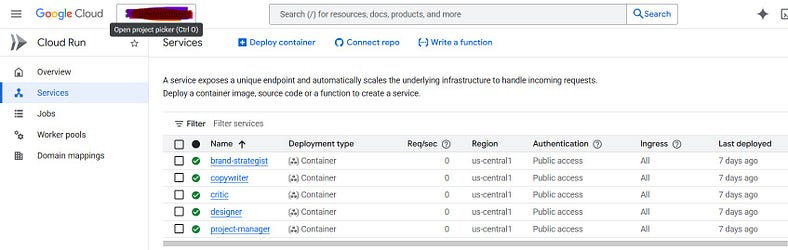
Navigate to Cloud Run in Google Cloud Console. You should see all 5 specialist agents deployed as independent services:
✅ brand-strategist — Ready to research markets
✅ copywriter — Ready to write compelling copy
✅ designer — Ready to create visual concepts
✅ critic — Ready to review and provide feedback
✅ project-manager — Ready to organize tasks in Notion
Key indicators:
— Green checkmarks = healthy and running
— Each service has its own URL (the A2A endpoint)
— Auto-scaling configured (0 to 10 instances)
— Currently scaled to zero (no idle costs!)
Orchestrator Deployed to Agent Engine
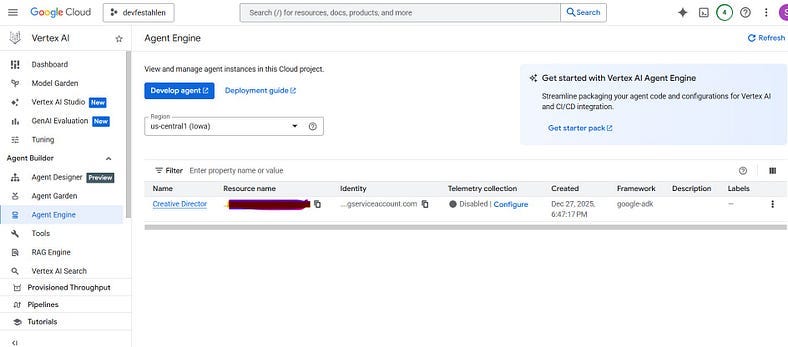
Navigate to Vertex AI > Agent Engine in Google Cloud Console. You should see:
📋 Display name: Creative Director
Live Execution in Agent Engine Playground
Click on the Creative Director then go into the “Playground” Tab. A session will be created for you. Enter a prompt !
The execution flow visible in the playground as in demo:
Thank you for following this series!
If you built something with these patterns, I’d love to hear about it. Share your projects, questions, and improvements.
Happy building! 🚀
Code Repository: https://github.com/Saoussen-CH/ai-creative-studio-adk-a2a-mcp-vertexai-cloudrun
Thanks for reading! If this was helpful, hit the ❤️, drop a comment, ⭐ the GitHub repo, and subscribe so you don’t miss the next one. Let’s connect on LinkedIn!